How can we help?
Search our help center or browse by category below.
All Help Articles
Features
How does the battery last 12+ months?
How does WiFi work on SWELLFRAME?
What does "always on" mean?
What forecast data does SWELLFRAME show?
• Wave height: swell size in feet or meters
• Swell period: interval between waves (longer = more power)
• Wind speed & direction: offshore, onshore, or cross-shore
• Tide data: current level plus high/low times
• Session rating: our at-a-glance quality score (stars or verbal)
• Best windows: the optimal times to surf today
• 7-day outlook: so you can plan your week
All of this is updated multiple times per day, automatically.
What visuals do you have?
For your spot
• 7-day Overview: the week at a glance with the best sessions picked out
• 7-day Classic: seven columns, wave size and rating for every morning and afternoon
• 7-day Tides: the week with each day's tide curve and weather
• 2-day Focus: hour by hour for today and tomorrow, with a map of your break
• Local Insights: a briefing written for your spot three times a day, beside its map, in a tall or a wide layout
For your favorites and your region
• Best Bets: your favorite spots, or every spot in your region, ranked for today, tomorrow and later in the week
• Best Bets Detailed: the same ranking hour by hour, plus the best spot for each of the next seven days
Here is the 7-day Overview for Lower Trestles on an example week:
 And Best Bets for a list of favorite spots:
 See all ten in a frame on our spot finder.
How is the display readable in all conditions?
Getting Started
How does SWELLFRAME work?
Does it need WiFi?
Does it need to stay plugged in?
What comes in the box?
What is the pairing token and where do I find it?
How to get your pairing token:
- Switch on your Swellframe and complete the WiFi setup.
- Once connected, the screen will show a QR code and a pairing token.
- Scan the QR code with your phone to go straight to account setup, or visit swellframe.co and enter the token manually.
How do I set up my SWELLFRAME?
Step 1: Switch it on
Turn on the power switch. Within a few seconds the e-ink screen wakes up and shows the setup screen. If the screen stays blank, charge your Swellframe with the included USB-C cable for a few minutes and try again.
Step 2: Connect to WiFi
This is the setup screen you will see:
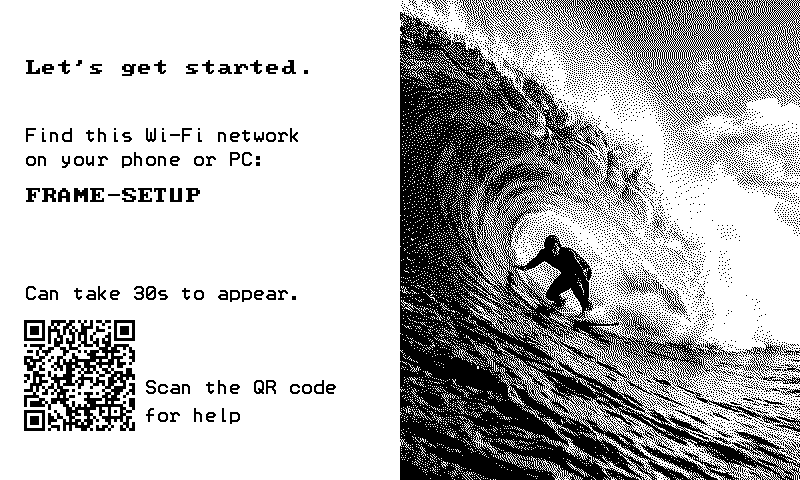 On your phone or computer, open WiFi settings and join FRAME-SETUP. No password is needed, and the network can take up to 30 seconds to appear. A setup page opens automatically (if it does not, open a browser and go to 192.168.4.1). Pick your home WiFi network, enter its password, and save.
Step 3: Pairing token appears
Once your Swellframe is online, the screen changes to the pairing screen. A surf photo sits on the left, and on the right you will see your pairing token and a QR code:
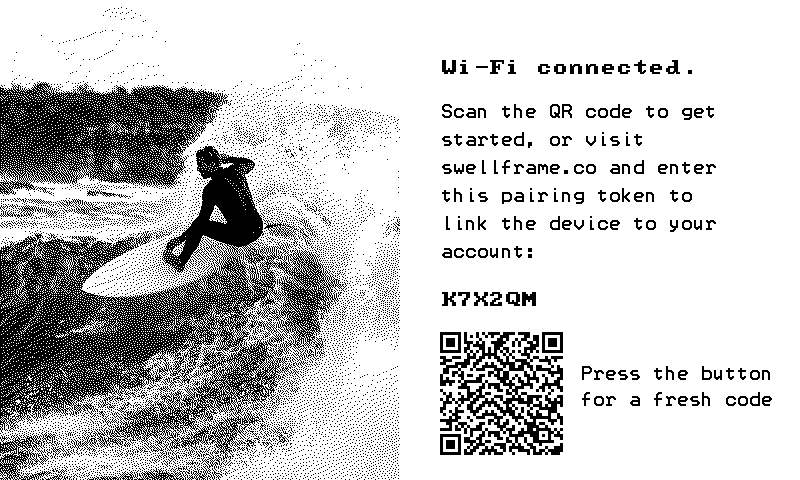 Either scan the QR code with your phone camera (it takes you straight to signup with the token filled in) or go to swellframe.co and type the six-character token. It never uses 0, 1, I or O, so there is nothing to mistake. The token is active for about 15 minutes. Press the button on the back for a fresh one.
Step 4: Create your account and claim
Follow the signup flow: enter your name and email, then pick your first surf spot. Once you complete signup, the device detects the claim automatically within seconds.
Step 5: Welcome screen
The display updates to a welcome message:
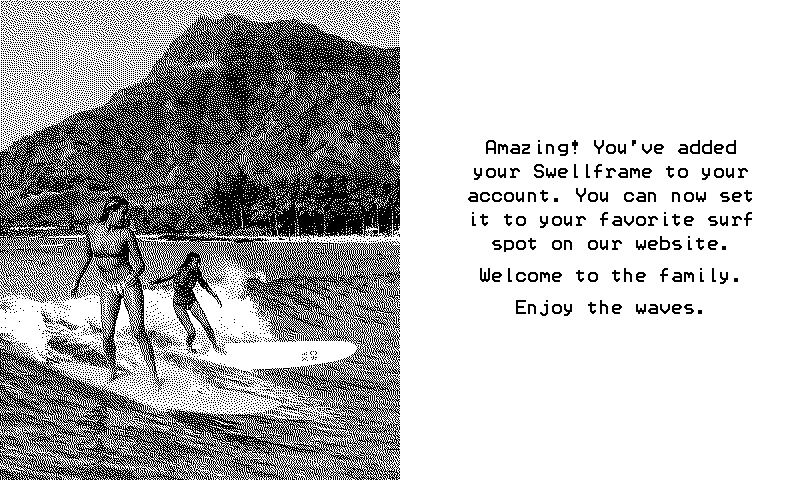 Step 6: Your first forecast
The device fetches your forecast and renders it on screen. From here on, it refreshes automatically every 3 hours. You can manage your slides, spots, and settings anytime at portal.swellframe.co.
Token expired? If you see "Your Claim Token Has Expired" on the screen, just press the reset button on the back. A fresh token will appear within seconds.
What is the SWELLFRAME portal?
• View and configure your slides (add, remove, reorder, change format)
• Pick surf spots for each slide
• Switch between star and verbal ratings
• Adjust your refresh interval and monitor battery life
• See your device status and last check-in
• Request new surf spots and contact support
Changes you make in the portal are pushed to your device on the next refresh.
Can I mount it on the wall?
Can I move it to a different WiFi network?
My screen says "Wi-Fi cleared." What does that mean?
What was preserved:
- Your account
- Your surf spots
- Your slide selections and layout
- On your phone or computer, connect to the FRAME-SETUP WiFi network.
- A setup page will open automatically. Pick your WiFi network, enter the password, and save.
- Your Swellframe will reconnect and start showing your forecast again within seconds.
What does the reset button do?
Quick press
- Forces an instant refresh: the device wakes up, connects to WiFi, pulls your latest settings and forecast data, and updates the screen.
- Use this any time you change a slide or spot in the portal and want to see the result immediately instead of waiting for the next 3-hour cycle.
- Also generates a new pairing token if the device hasn't been claimed yet (or if the previous token expired).
- Opens the SETTINGS menu on the screen. Holding longer than 2 seconds does the same thing, so there is no need to time it.
- Then press once for WiFi setup: the device creates the FRAME-SETUP hotspot so you can connect it to a new network. Your account, slides, and spot selections are saved in the cloud and stay intact.
- Looking for a factory reset? That is done from the portal, not the button, so it can never happen by accident. See "How do I factory reset my Swellframe?" in the Support section.
- Do nothing for 30 seconds and the menu closes on its own, with your forecast back on screen and nothing changed.
I changed my slide but the display didn't update right away. Is that normal?
The 3-hour cycle
- New forecast data is published every 3 hours.
- Your Swellframe wakes up on the same schedule, pulls fresh data, renders the display, and goes back to sleep.
- This is by design: it keeps battery life at 12+ months on a single charge.
- Press the reset button on the back of the device.
- This triggers an instant pull: the device wakes up, grabs your latest settings and forecast, and updates the screen within seconds.
- Any time you change a slide, switch a spot, or just want a fresh render, one press is all it takes.
- If you have more than one slide, the device rotates through them every ~30 seconds.
- To support this rotation the refresh interval drops to 5 minutes, but that does not mean new forecast data arrives every 5 minutes.
- Forecast data still updates every 3 hours. The shorter interval simply keeps the slide rotation running smoothly.
I ordered more than one Swellframe. How do I set them up?
Keeping both for yourself?
- Click Claim Swellframe #1 and create your account. Any included subscription lands here.
- Open the Swellframe #2 link and choose Log in and claim it to add it to the same account.
Gifting one?
Open that Swellframe's claim button and choose It's a gift, send it to them. We email the lucky recipient their own activation link, and they set it up under their own account. The included subscription stays with the Swellframe it is marked on, so gifting the second frame never gives away your subscription.
Your Forecast
How often does the forecast update?
If you have multiple slides, the refresh interval automatically shortens to 5 minutes so the device can rotate between them, but that does not mean new forecast data arrives more often. The underlying data still updates every 3 hours.
Want an immediate update? Press the reset button on the back of the device to trigger an instant pull.
Can I choose my surf spot?
Can I show different spots on different slides?
What if I want to change my surf spot later?
What slide types can I choose from?
2-Day Detail: Hourly breakdown for the next 2 days. Wave height, wind, tide, session ratings, sunrise/sunset, water temp, and a "Days to Watch" section flagging upcoming good sessions.
7-Day Outlook: A full week at a glance with morning and afternoon conditions for each day, plus the best 3 sessions ranked by quality.
Local Insights (AI Briefing): A personalized, editorial-style forecast written by our AI in natural surf language. Covers today, tomorrow, and the rest of the week with specific insights about conditions. Greets you by name.
You can add, remove, and reorder slides from the portal. Each slide can show a different spot and a different format.
What is Local Insights?
Today: what to expect right now, the best window to paddle out, and specific conditions (wave size, wind direction, tide timing).
Tomorrow: whether conditions are building, holding, or fading, and when to go.
Rest of the Week: the bigger picture trend so you can plan ahead.
It greets you by your first name and is written in real surf language, not generic weather copy. Every insight is specific to your spot and the actual forecast data.
How does the slide rotation work?
How does multi-slide mode affect battery life?
What does the 2-Day Detail slide show?
• Hourly wave height and swell period
• Wind speed and direction for each time block
• Tide times (high and low)
• Session quality ratings (stars or verbal)
• Sunrise and sunset times
• Water temperature and wetsuit recommendation
• "Days to Watch" section highlighting upcoming sessions worth planning for
It's designed to answer "should I surf today or tomorrow, and when?"
What does the 7-Day Outlook slide show?
Can I request a new surf spot?
What if my surf spot isn't listed?
Is AI forecasting included?
Every Swellframe ships with the forecast you need built in, free forever.
Local Insights, our AI written daily briefing, and multi-slide rotation are premium features, included with any of the three annual subscriptions.
- 1-Year Plus, $9.99 a year. One device, one sport.
- 1-Year Pro, $19.99 a year. Up to two devices, two sports.
- 1-Year Unlimited, $29.99 a year. Unlimited devices, every sport.
Every paid tier includes all premium features. The tiers differ in how many devices and sports you can run, not in what they unlock.
How Our Forecast Works
Where does Swellframe get its surf data?
Each spot's forecast is refreshed every three hours and cached so your device always has the latest conditions. Currently, 752 surf spots across 15 countries are active in the system, spanning the US East and West Coasts, Hawaii, the Caribbean, Western Europe, and Morocco.
How does Swellframe turn raw ocean data into wave heights?
1. Shelf Attenuation: wide continental shelves absorb swell energy through friction. New Jersey's 80-mile shelf eats about 25% of incoming swell before it reaches shore, while Hawaii has no shelf so swells arrive at full power.
2. Period Shoaling: long-period swells break bigger than short-period swells at the same height. A 14-second groundswell produces roughly 14% taller breaking waves than a 10-second swell.
3. Break Amplification: reef breaks amplify waves more than beach breaks because the seafloor rises abruptly, causing waves to jack up.
4. Spot Calibration: a fine-tuning factor for each spot to match what surfers actually see in the water.
The result: Display Height = Raw Swell x Shelf x Shoaling x Break Amp x Spot Cal
Why does the same buoy reading show different heights at different spots?
Continental shelf width is the biggest variable. A 5 ft reading on an offshore buoy loses about 25% crossing New Jersey's wide shelf (showing as 3-4 ft at the beach), but arrives nearly intact in Hawaii (showing as 4-5 ft).
Break type matters too. A reef break amplifies incoming swell more than a beach break because waves shoal abruptly over shallow reef. The same raw swell produces taller waves at Pipeline (reef) than at a gentle sandy beach.
Swell period affects how much waves grow as they approach shore. A 14-second groundswell breaks bigger than a 7-second windswell at the same height.
This is why Swellframe applies spot-specific corrections rather than just showing the raw buoy number.
Why does a long-period swell produce bigger waves than a short-period swell at the same height?
A long-period swell (14+ seconds) was generated by a distant storm thousands of miles away. These waves travel deep beneath the surface, interact with the seafloor earlier, and undergo more shoaling amplification as they approach the coast. The result: they break taller, more powerfully, and more organized than the raw height suggests.
A short-period swell (under 8 seconds) was generated by local wind. These waves are steep, choppy, and carry less energy per wave. They don't grow much as they approach shore.
In practice, a 3 ft swell at 16 seconds can produce breaking waves nearly as tall as a 4 ft swell at 8 seconds, but with significantly more power behind each wave. That's why experienced surfers get excited about period, not just height.
How do the star ratings work?
Wave Energy (biggest factor): computed from wave height and period. Bigger waves with longer periods score higher.
Swell Period: bonus points for long-period groundswell, which produces better-shaped waves.
Swell Direction: how well the swell direction matches the spot's ideal angle.
Tide: whether the tide stage favors the break (most spots prefer low tide).
Wind: offshore wind boosts the score; onshore wind caps or reduces it.
| Stars | Label | What it means |
|---|---|---|
| 1 | Sucks | Not worth paddling out |
| 2 | Rideable | Marginal conditions |
| 3 | Fun | Good session, worth the paddle |
| 4 | Pumping | Great conditions |
| 5 | Legendary | Best it gets |
How does Local Insights explain conditions?
Energy labels (soft, moderate, punchy, powerful, heavy) that capture both wave size and period in a single word.
Swell character descriptions like "short-period windswell" or "long-period groundswell" that explain where the swell came from.
The AI uses these to write copy that helps beginners understand what the conditions actually mean. Instead of just "3-4 ft @ 14s," a beginner reads something like: "A punchy long-period groundswell fills in this morning with clean offshore conditions. Best window is 6-8am before the wind shifts."
Three briefings are generated per day (morning, afternoon, evening), each tailored to the time of day and what's ahead.
How accurate is Swellframe?
This achieves roughly 80% of the accuracy of premium bathymetric models at a fraction of the complexity. Our scoring engine also considers more variables (tide conditions, precise swell direction matching, wind direction classification) than most other services' automated rating systems.
We periodically validate our forecasts against other major surf forecast services and refine our regional calibration factors based on those comparisons. If you notice a consistent mismatch at your local spot, let us know: that feedback helps us tune the model.
Virtual SWELLFRAME
What is a Virtual SWELLFRAME?
How do I claim my SWELLFRAME?
What if I lost my claim email?
Do I need the physical device before creating an account?
What happens when my physical SWELLFRAME arrives?
- Connect to the FRAME-SETUP WiFi network on your phone and enter your home WiFi password.
- The device connects and displays a pairing token and QR code on screen.
- Scan the QR code (or enter the token at swellframe.co) and log in to your existing account.
Will I lose my settings when I connect the physical device?
Why do support records show my order number instead of a device ID?
I already created my account before the device shipped. Is that okay?
Rating Systems
What are SWELLFRAME's two rating modes?
Stars: a quick visual scale from ★ (worst) to ★★★★★ (best).
Verbal: plain-language labels: Sucks · Rideable · Fun · Pumping · Legendary.
Both modes show the exact same underlying rating. They're just different ways to display it. You can switch anytime in the portal below the slide preview.
How do the star and verbal ratings line up?
| Stars | Verbal | What it means |
|---|---|---|
| ★ | Sucks | Not worth paddling out. Small, wind-blown, or generally poor. |
| ★★ | Rideable | You can get waves, but don't cancel plans for it. |
| ★★★ | Fun | Solid session. Decent swell with manageable wind. Go surf. |
| ★★★★ | Pumping | Really good. Clean conditions, solid swell, offshore or light winds. |
| ★★★★★ | Legendary | Best of the best. Epic swell, perfect wind, long period. Don't miss it. |
| ★★★★★ | Pro Only | Extremely large or powerful surf. Experienced surfers only. |
How does SWELLFRAME actually calculate its ratings?
What does "Pro Only" mean?
Can I switch between star and verbal ratings?
Orders & Shipping
Can I cancel or refund a subscription?
The membership included with your Swellframe (6 months of Unlimited, plus any 1-year plan bought with your order). Your included Unlimited is switched on when you add a payment method during setup. Nothing is charged then. When your included time (and any subscription bought with your Swellframe) ends, your plan renews once a year at the listed price until you cancel. You can cancel anytime from Account, Subscription, and you will never be charged before your included time ends. If you would rather not add a card, choose the Free plan: your Swellframe keeps working with the basic forecast, no card needed. A subscription bought with your order is prepaid for its full term and is not refundable.
A subscription you pay for yearly can be canceled anytime from Account, then Plan (Manage plan). Canceling stops the renewal: you keep your plan until the end of the period you already paid for, and no further charges happen. Past charges are not refunded.
Switching between plans is always possible from the same place, with fair credit for what you already paid.
What is the return policy?
Can I cancel my pre-order?
Yes. You can cancel a pre-order, or any order that has not shipped yet, at any time and for any reason. You get a full refund to your original payment method.
Email [email protected] with your order number and we will cancel the order and confirm by email. Card refunds usually appear within five to ten business days, depending on your bank.
Once your order has been handed to the carrier it can no longer be cancelled, but our return policy still applies: you can return it within 30 days of delivery. See Shipping & Returns.
Is my SWELLFRAME under warranty?
Yes. Every new Swellframe includes a one-year limited hardware warranty covering defects in materials and workmanship under normal use. Coverage starts the day your device is delivered.
If a new device will not power on or will not connect to Wi-Fi during first setup, tell us within 30 days of delivery and we will replace it, shipping covered both ways.
The warranty does not cover drops, liquid or sand damage, misuse, unauthorized repairs, cosmetic wear, or normal battery capacity loss over time. To start a claim, email [email protected] with your order number and a short description of the problem.
When will SWELLFRAME ship?
Can I switch my Swellframe between sports?
Yes. Each Swellframe shows one sport at a time, and how freely you can switch depends on your plan.
- Free. One sport. Upgrade to change it.
- Plus. One sport, which you can change once every 12 months.
- Pro. Pick two sports. Your Swellframes can switch between those two as often as you like. The two sports you pick stay set for 12 months, and after that you can choose a different pair.
- Unlimited. Every sport, on any Swellframe, switched any time.
The Unlimited months included with your Swellframe have no lock, so nothing is set until they end. You change what a Swellframe shows in the portal.
Can I use SWELLFRAME without a subscription?
Yes. Every Swellframe comes with the forecast you need, and that is yours forever with nothing to pay.
The subscriptions are for ocean and mountain folks who want to go deeper: richer visual slides, more spots to follow, and more than one sport on the same frame.
- 1-Year Plus, $9.99 a year. One device, one sport.
- 1-Year Pro, $19.99 a year. Up to two devices, two sports.
- 1-Year Unlimited, $29.99 a year. Unlimited devices, every sport.
Every paid tier includes all premium features. The tiers differ in how many devices and sports you can run, not in what they unlock.
The Free plan never asks for a card; a payment method is only needed to switch on the included premium months or a subscription.
Will there ever be a monthly fee for the basic forecast?
No. The forecast you check every morning is included with every Swellframe purchase and stays yours forever. No monthly fee, no annual renewal, no paywall creeping over it later.
The optional subscriptions are billed annually, never monthly, and only add extras on top.
- 1-Year Plus, $9.99 a year. One device, one sport.
- 1-Year Pro, $19.99 a year. Up to two devices, two sports.
- 1-Year Unlimited, $29.99 a year. Unlimited devices, every sport.
Every paid tier includes all premium features. The tiers differ in how many devices and sports you can run, not in what they unlock.
Why are the subscriptions paid?
We want to be transparent about this. The premium features carry real ongoing costs on our end.
Local Insights generates a personalised AI briefing for your spot every single day, which means running AI models against your forecast data daily. Multiple slides make your frame refresh far more often so it can rotate between them, which is many times more server requests per device.
The subscriptions are billed annually so we can keep delivering those sustainably without ever resorting to ads, selling data, or putting the core forecast behind a paywall. The base forecast is free forever. The paid tiers exist so people who want more can get more, and the cost stays honest.
Sustainability
What makes SWELLFRAME sustainable?
• Ultra-low power: a full year of operation uses less energy than charging your phone for a single day
• No planned obsolescence: firmware updates are free forever, and the hardware is built to last years
• 12+ months per charge: one USB-C charge keeps it on your wall for a year or more
• No plastic in the box: every SWELLFRAME ships in kraft paper packaging
• Giving back: you can donate your referral reward to the Surfrider Foundation
We believe surf products should protect the ocean, not pollute it.
How much energy does SWELLFRAME use?
Is SWELLFRAME designed to last?
What about the packaging?
What is the Round Up for the Ocean?
Are there ads on SWELLFRAME?
Our slogan is Know when to paddle out. Everything you need, nothing you don't. We mean that literally. Ads are something you don't need, so we don't have them now and we never will.
There are no ads on any tier of SWELLFRAME, free or paid. Your forecast display will never show sponsored content, banners, pop-ups, or promotions of any kind. Not today, not ten years from now.
Swellframe is funded by hardware sales and subscriptions. We will never monetize your attention or sell your data. That's not a marketing line. That's the deal.
Community
Who created SWELLFRAME?
How can I help grow the SWELLFRAME community?
How does SWELLFRAME give back to the ocean?
• Round Up for the Ocean: buyers can round up to the next whole dollar at checkout. We match every dollar, sending double to the Surfrider Foundation per round-up.
• Referral donations: when you refer a friend, you can donate your share of the reward to Surfrider instead of keeping it as store credit.
Surfrider is a nonprofit dedicated to the protection and enjoyment of the world's ocean, waves, and beaches. Every dollar we send goes directly to their mission.
Can I submit a surf spot?
Is SWELLFRAME built by a big tech company?
Support
How do I contact support?
My SWELLFRAME isn't updating. What should I check?
- Press the reset button on the back of the device. This forces an immediate refresh and is the quickest fix.
- Check your WiFi: make sure other devices on the same network can connect to the internet.
- Verify power: confirm your Swellframe is plugged in or has battery remaining.
- Check the portal: log in to portal.swellframe.co and look at the last check-in time under your device status.
- Move closer to the router temporarily if the signal might be weak.
Does SWELLFRAME get firmware updates?
Is my data private?
Is SWELLFRAME available in other languages?
How do I transfer my Swellframe to someone else?
- Log in to portal.swellframe.co and open Account, then Devices.
- Open the frame, click Remove from Account, and confirm.
- Press the button on the back of the frame. It wakes up, erases its WiFi and settings, and restarts like a new frame. (If you skip this, it does the same on its own within 3 hours, as long as it is still on your WiFi.)
How do I factory reset my Swellframe?
- Log in to portal.swellframe.co and open Account, then Devices.
- Open the frame, click Remove from Account, and confirm.
- Press the button on the back of the frame. It wakes up, erases its WiFi and settings, and restarts like a new frame. If you do not press it, the frame does the same on its own within 3 hours, as long as it can still reach your WiFi.
- Removes the frame from your account.
- Wipes the saved WiFi network and settings on the frame.
- Keeps the hardware device ID (this is permanent and never changes).
- Returns the frame to its out of the box state, ready for a fresh setup by you or a new owner.
Only need to connect to a different WiFi network? You do not need a factory reset: hold the button on the back for about 2 seconds, let go, and press once for WiFi setup. Your account, spots and slides stay as they are.
| What you do | Action |
|---|---|
| Quick press | Instant refresh |
| Hold about 2 seconds, then let go | Opens the SETTINGS menu |
| In the menu: one press | WiFi setup mode |
| Portal: Account, Devices, Remove from Account | Factory reset |
| Setup page (FRAME-SETUP): Reset this frame | Erase the frame without internet |