Switch on your Swellframe
Turn on the power switch. Within a few seconds the e-ink display shows the setup
screen with the Wi-Fi network name FRAME-SETUP. If the screen
stays blank, charge it with the included USB-C cable for a few minutes and try again.

Connect to the Swellframe Wi-Fi
On your phone or computer, open Wi-Fi settings and look for
FRAME-SETUP. It can take up to 30 seconds to appear. Tap to join.
No password is needed. A setup page will open automatically after a few seconds.
Pick your home Wi-Fi
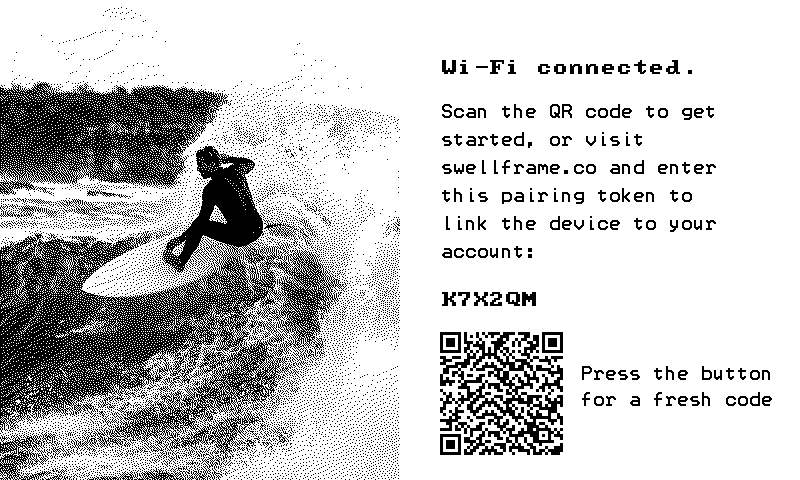
On the setup page, select your home Wi-Fi network from the list and enter the password. Your Swellframe will save the credentials and connect. Once it is online, the screen changes to the pairing screen with your device token and a QR code:
Create your account
Visit swellframe.co/signup to create your account. Accounts are for Swellframe and MNTNFRAME owners, so sign-up asks for one of the three things below. Any one of them works.
Where to find your order number or device token
Your order number
It is at the top of the order confirmation the shop emailed you when you bought, written like #1042. It is also in our email titled Your Virtual Swellframe is ready!, on the line that reads Order 1042. Type it exactly as shown, with or without the #. Then open the link in the confirmation email we send you: that is when your frame is added to your account.
The claim link
That same email has a Claim Virtual Swellframe button. Press it and there is nothing to type: the link carries your order for you and the sign-up page fills itself in.
Your device token
Once your frame is on Wi-Fi and not yet paired, its screen shows a short code and a QR code. The code is your device token: six letters and numbers, like K7X2QM. It never uses 0, 1, I or O, so there is nothing to mistake. Type it in, or scan the QR with your phone to skip typing altogether.
Already have an account? None of this applies. Just log in, whichever way you signed up.
Choose your surf spot
As soon as your account is linked, the frame shows a welcome screen:

From the portal, pick your local break using the spot search. Your Swellframe will pull the latest forecast and display it within minutes.
192.168.4.1.
Regulatory Information
This section contains the regulatory and compliance information for the OG-01 e-ink display, marketed under the trade names SWELLFRAME and MNTNFRAME. It applies to both.
Product identification
Model: OG-01
Trade names: SWELLFRAME, MNTNFRAME
Contains FCC ID: 2AC7Z-ESPC3MINI1
Contains IC: 21098-ESPC3MINI1
CAN ICES-003(B) / NMB-003(B)
Power input: 5 V DC via USB-C
Supplier's Declaration of Conformity, compliance information statement (47 CFR 2.1077)
Product: OG-01, marketed as SWELLFRAME and MNTNFRAME
This device complies with Part 15 of the FCC Rules. Operation is subject to the following two conditions: (1) this device may not cause harmful interference, and (2) this device must accept any interference received, including interference that may cause undesired operation.
Responsible party:
Swellframe, Inc.
1405 Laurel Avenue
Ocean, NJ 07712, USA
swellframe.co/support
Tested by F2 Labs, Middlefield, Ohio. Report F2X37660B-01E.
FCC notices
Changes or modifications not expressly approved by the party responsible for compliance could void the user's authority to operate the equipment.
This equipment has been tested and found to comply with the limits for a Class B digital device, pursuant to Part 15 of the FCC Rules. These limits are designed to provide reasonable protection against harmful interference in a residential installation. This equipment generates, uses and can radiate radio frequency energy and, if not installed and used in accordance with the instructions, may cause harmful interference to radio communications. However, there is no guarantee that interference will not occur in a particular installation. If this equipment does cause harmful interference to radio or television reception, which can be determined by turning the equipment off and on, the user is encouraged to try to correct the interference by one or more of the following measures:
- Reorient or relocate the receiving antenna.
- Increase the separation between the equipment and receiver.
- Connect the equipment into an outlet on a circuit different from that to which the receiver is connected.
- Consult the dealer or an experienced radio/TV technician for help.
Innovation, Science and Economic Development Canada notices
This device contains licence-exempt transmitter(s)/receiver(s) that comply with Innovation, Science and Economic Development Canada's licence-exempt RSS(s). Operation is subject to the following two conditions: (1) this device may not cause interference; (2) this device must accept any interference, including interference that may cause undesired operation of the device.
L'émetteur/récepteur exempt de licence contenu dans le présent appareil est conforme aux CNR d'Innovation, Sciences et Développement économique Canada applicables aux appareils radio exempts de licence. L'exploitation est autorisée aux deux conditions suivantes : (1) l'appareil ne doit pas produire de brouillage; (2) l'appareil doit accepter tout brouillage radioélectrique subi, même si le brouillage est susceptible d'en compromettre le fonctionnement.
CAN ICES-003(B) / NMB-003(B)
RF exposure
This equipment complies with FCC and ISED radiation exposure limits set forth for an uncontrolled environment. This equipment should be installed and operated with a minimum distance of 20 cm between the radiator and your body.
Cet équipement est conforme aux limites d'exposition aux rayonnements de la FCC et d'ISDE établies pour un environnement non contrôlé. Cet équipement doit être installé et utilisé à une distance minimale de 20 cm entre la source de rayonnement et votre corps.
Viewing regulatory information on the device
The OG-01 displays its regulatory label electronically on its e-ink screen. To view it: press and hold the button on the back for two seconds, then let go. The SETTINGS screen appears with the FCC ID and IC lines along its bottom edge. Leave the button alone and the screen returns to the forecast after 30 seconds.
Battery and disposal
This product contains a lithium-ion battery. Do not incinerate. Recycle or dispose of in accordance with local regulations.